Quiz
Quiz blocks generate an assignment and react to its result. The Task Module is required. See Writing Tasks & Quizzes for the wearer's task flow.
Blocks
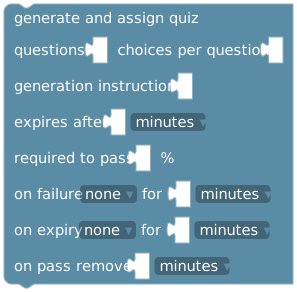
Supply question count, choices per question, generation instructions, expiry duration, pass percentage, failure/expiry penalties, and time removed on pass. Generates in the background and assigns a private quiz only after validation.
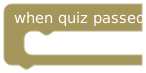
Runs after a passed result and its configured outcomes are saved.
Event variables
The following values plus the common event variables.
| Event variable | Type | Description |
|---|---|---|
| quiz run id | string | ID of this generated quiz assignment. Use it to distinguish separate quiz runs. |
| quiz status | string | Status reported for this assignment or quiz result. |
| score percent | number | Score for this quiz run, expressed as a percentage. |
| correct answers | integer | Number of correct answers in this quiz run. |
| total questions | integer | Total number of questions in the quiz. |
| answered questions | integer | Number of questions answered before the result or expiry. |
| required pass percent | number | Percentage required to pass this quiz. |
| task id | string | ID of the task definition. Reassigning the same task can produce a different task run ID. |
| task run id | string | ID of this particular task assignment. Save it to match later completion or review events. |
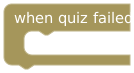
Runs after a failed result and its configured outcomes are saved.
Event variables
The following values plus the common event variables.
| Event variable | Type | Description |
|---|---|---|
| quiz run id | string | ID of this generated quiz assignment. Use it to distinguish separate quiz runs. |
| quiz status | string | Status reported for this assignment or quiz result. |
| score percent | number | Score for this quiz run, expressed as a percentage. |
| correct answers | integer | Number of correct answers in this quiz run. |
| total questions | integer | Total number of questions in the quiz. |
| answered questions | integer | Number of questions answered before the result or expiry. |
| required pass percent | number | Percentage required to pass this quiz. |
| task id | string | ID of the task definition. Reassigning the same task can produce a different task run ID. |
| task run id | string | ID of this particular task assignment. Save it to match later completion or review events. |
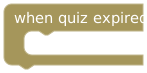
Runs after expiry and its configured outcomes are saved.
Event variables
The following values plus the common event variables.
| Event variable | Type | Description |
|---|---|---|
| quiz run id | string | ID of this generated quiz assignment. Use it to distinguish separate quiz runs. |
| quiz status | string | Status reported for this assignment or quiz result. |
| score percent | number | Score for this quiz run, expressed as a percentage. |
| correct answers | integer | Number of correct answers in this quiz run. |
| total questions | integer | Total number of questions in the quiz. |
| answered questions | integer | Number of questions answered before the result or expiry. |
| required pass percent | number | Percentage required to pass this quiz. |
| task id | string | ID of the task definition. Reassigning the same task can produce a different task run ID. |
| task run id | string | ID of this particular task assignment. Save it to match later completion or review events. |
Choose 1–20 questions and 2–6 choices per question. Failure and expiry penalties can be none, add time, freeze, or pillory. Durations are limited to seven days. The deadline starts at assignment, and the wearer gets one scored attempt.
Subscribed wearers have 10 included generation attempts per rolling 24 hours, shared across their programmable locks. Failed generation attempts count. Beyond that, or without a subscription, generation uses the wearer's own OpenRouter key, model, and credits configured in Settings → General, Bot Coach, or AI Coach.
Result values
Inside a quiz event, event variable offers quiz run ID, status, score percentage, correct/total/answered question counts, required pass percentage, task ID, and task run ID. Filter by run ID when you need to distinguish assignments.
The generation action does not wait for a result. Put result-dependent actions in the appropriate quiz event. Configured rewards and penalties have already been processed before that event; adding the same reward again in the event would be an additional effect.
Example: report the score
In when quiz passed, use create text with to join "Quiz passed: ", score percent, and "%", then send it using send notification. Use separate failed and expired events for their own messages. Test each event with draft inputs before enabling live assignment.