Lock Actions
Lock Actions change the live lock when their event runs. Connect them inside an event or function, in execution order. An action can fail if its feature is disabled, the lock is in an incompatible state, or the caller lacks permission. Earlier successful actions are not automatically undone.
For durations and timestamps, read Time & Date. Prefer Duration blocks for intervals and date/time blocks for absolute dates.
The secondary-keyholder editor uses the ordinary controls and compiler. Direct secondary runs additionally require the corresponding action permission and available allowance; editing a program does not itself authorize every effect. See the supported direct actions and limits.
Community-chat gag
Use enable community-chat gag for seconds (optional) to gag community chat on an eligible keyholder-controlled lock. Connect a Duration block or number of seconds for a timed gag; leave the socket empty for an indefinite gag. Use disable community-chat gag to remove it. The lock must be active and shared with a trusted keyholder. These controls are not available for self locks and do not control direct messages or Coach chat. Eligibility checks apply even when a wearer runs a program button; use a keyholder-only button if wearers must not invoke it.
Timed durations are 1 second to 365 days. Enabling again replaces the previous deadline; an empty duration makes it indefinite. Removing a gag affects only this lock, not gags from other locks. Expiry stops blocking chat at the deadline. Ending the lock, losing trust, or changing the wearer/keyholder clears the gag.
For example, a keyholder-only button can enable a ten-minute gag, while a second keyholder-only button removes it. Check Lock Data → is → community-chat gag enabled for the current state. To react to changes, use the gag status event. See the Code example for the same program in Code.
Time and freezing
Adds the supplied amount using the selected unit. Check the resulting lock state; maximum-time and lock-type rules still apply.

Removes the supplied amount using the selected unit. Reducing the countdown does not remove other unlock requirements.

Replaces the timer end with a Unix timestamp in seconds, up to 365 days from now and within the maximum end time. Timer locks only; unfreeze first. A past date expires the timer.
Replaces remaining time with a duration measured from now. Timer locks only; unfreeze first. The maximum end time and 365-day limit apply. Zero expires the timer.
Freezes for the supplied duration and unit, subject to the lock's freeze policy.
Freezes until a timestamp in seconds. Past dates are skipped. The end must be at least one minute away; more than seven days requires a trusted keyholder or trap mode. Keeps an existing longer or indefinite freeze. Trap-mode freezes remain indefinite.
Freezes without an end time. Provide a separate way to unfreeze when the intended condition is met.

Adds time to an active timed freeze. Does nothing if not frozen or frozen indefinitely.
Requests that the lock leave its frozen state.
Unfreezes a frozen lock; otherwise freezes it for one hour. Freezing in trap mode remains indefinite.
Setting a timer to zero or to a past date does not have the same effect as unlock lock now.
During a hygienic or soft emergency release that pauses the timer, freeze for and freeze until start a separate timed freeze while preserving the original paused state. For example, a 20-minute freeze started during a break still has 15 minutes left if the wearer re-locks 5 minutes later. If it expires first, the timer stays paused until re-locking. A separate indefinite freeze remains indefinite; extend freeze still needs a timed freeze to extend. Unfreeze actions can remove the separate freeze, but cannot finish the temporary release's pause.
Public voting
The Lock Actions toolbox includes controls for public voting and values for reading its current state. Public voting uses vote counts and the lock's normal closing rules; it does not have a separate pillory-style duration.
| Block | Effect |
|---|---|
| Enable / disable public voting | Opens or stops voting without resetting votes, history, or voter cooldowns. Enabling creates a share link when needed. |
| Public voting options | Select add, remove, and random vote choices and set the cooldown in whole hours. |
| Public voting time per vote | Set add/remove seconds and the signed random time range. These affect future votes. |
| Public voting requirements | Set whether votes are required to unlock, the required total, and optional auto-close total. |
| Public voting visibility | Choose public-page listing and whether voters need an account. |
| Public voting enabled / open | Boolean values. Open also checks lock closure and the auto-close threshold; individual voter cooldowns and account requirements still apply. |
| Total votes / required votes / votes still needed | Numeric values. Votes still needed is zero when voting or its unlock requirement is disabled. |
Configure options and requirements before enabling voting. The requirements and auto-close counts are totals for the lock, including votes already received. To ask for two more votes, set both totals to total votes + 2. Lowering an enabled auto-close limit to the current vote count closes voting immediately. Enabling again at an already-reached limit leaves it closed; raise the limit or turn auto-close off first.
Required votes are available only on timer locks. Both counts must be whole numbers from 1 to 10,000, and an enabled auto-close count must not be lower than the required count. Add/remove time must be 60–86,400 seconds, random minimum −86,400–0 seconds, random maximum 0–172,800 seconds, and cooldown 1–168 whole hours. Card locks retain their normal time-to-card conversion.
These blocks cannot override permanently disabled public voting. They preserve existing shock settings, vote history, share tokens, and cooldowns; changing the cooldown does not reset a voter's existing wait. Enabling uses the lock's normal closing rules and does not reopen an ended lock. Disabling voting does not unlock the lock or undo time/cards already changed by votes.
Example: request two more votes
On a running timer lock, paste this into the Code editor:
button("Start voting", () => {
   actions.publicVotingOptions({ allowAdd: true, allowRemove: false, allowRandom: false, cooldownHours: 6 });
   actions.publicVotingTimes({ addSeconds: 300, removeSeconds: 300, randomMinSeconds: -600, randomMaxSeconds: 600 });
   actions.publicVotingRequirements({ requireVotes: true, requiredVotes: values.publicVotingTotalVotes() + 2, autoClose: true, autoCloseVotes: values.publicVotingTotalVotes() + 2 });
   actions.publicVotingVisibility({ showPublic: false, requireAccount: true });
   actions.publicVotingStart();
   if (values.publicVotingOpen()) {
      print(values.publicVotingVotesRemaining());
   }
});
button("Stop voting", () => {
   actions.publicVotingStop();
});
on.communityVoteReceived(event => {
   actions.log({ title: "Public vote received", description: text("Total votes: ", event.voteTotalCount) });
});
Start voting enables add-only voting at five minutes per vote, requires signed-in voters, and keeps the link off the public listing. It sets the unlock and auto-close totals to two more than the current count. The existing community vote received event runs for actual saved votes; configuration changes do not produce vote events. This example preserves any shock settings already configured on the lock.
Test with a disposable timer lock and two eligible voter accounts. Start voting, copy its normal share link, and cast two votes. Check that the total rises by two, auto-close disables voting, and the event log records both totals. The lock's other unlock requirements still apply. To check stopping separately, start again, press Stop voting, and verify that the link rejects votes while its history remains intact.
In draft tests, supply Public votes already received, enabled/required-vote settings, and optional permanently-disabled/card-lock inputs. Setting a mock total of 3 makes the example require 5 votes and display 2 remaining. Drafts simulate configuration only; they do not create a real link, accept votes, or dispatch vote events. Test the vote handler separately with mock event values.
Public-voting actions can run inside ordinary functions and event handlers. A confirmation dialog before an action uses the normal pause/resume behavior: configuration changes happen when execution reaches the action. Read-only automatic values may read voting state, but cannot change it. Coach-called functions cannot change public-voting settings because there is no matching Coach permission.
Pillory
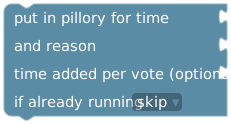
Supply voting duration, reason, and optional time added per vote. Choose skip or update current when pillory is already running. Updating replaces the remaining voting duration from now and preserves existing votes/totals.
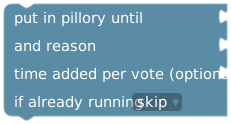
Uses an absolute timestamp, up to 365 days away. Past dates are skipped. Updating changes the end time and preserves votes/totals.

Ends the current pillory period.

Adds the supplied duration to the pillory voting period.

Removes the supplied duration from the pillory voting period.
For the two start blocks, an empty time added per vote keeps the current setting; a supplied duration changes it and must be between one minute and 24 hours. The pillory voting period and time added to the lock by votes are separate values.
The manual Put in Pillory dialog can set a one-time vote rate without changing the module defaults. Updating that active pillory with an empty time added per vote preserves its one-time rate. Supplying a rate replaces the override and updates the module setting. Starting a new pillory without a rate uses the module default again.
Games and daily progress

Changes today's completed wheel, dice, chess, casino, or AI/Bot chat progress. Does not change the configured daily target. Progress cannot become negative.

Clears the current cooldown for wheel, dice, chess, card game, tasks, Jigsaw, Daily Puzzles, PLE, or all activities. Configured duration, history, and daily progress stay the same. PLE clears all of this extension's control cooldowns, including the executing control. Unfinished puzzles remain active.
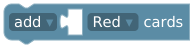
Changes the current deck by a whole number. Select Red, Red +1/+2/+3, Yellow, Green, Freeze, Sticky, Double Up, Reset, or Shock. Zero does nothing. Removal stops at zero and preserves greens needed to finish. Effects occur when drawn, not when added. Deck limits apply.

Sets a whole-number target from 1–5, preserving collected greens and adding missing greens to the deck. If already met, opens the normal unlock decision.
Card changes are unavailable while a green-card decision is pending. See Card Game for deck behavior.
Unlocking and visibility

Adds a manual unlock block with the supplied reason.
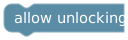
Clears this program's and Control Pass's manual unlock blocks. Other unlock requirements still apply.
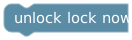
Immediately unlocks and ends the session, like the keyholder's green Unlock button. Remaining time and ordinary unlock requirements do not prevent it. It does not abandon the lock or remove the keyholder.

Prompts for a passcode and unlocks on a match. New codes require 4–12 letters or numbers. Repeated attempts cause increasing cooldowns. Configure the secret before runtime; an active editor cannot introduce a new password block or change its saved passcode.

Shows or hides remaining time.

Shows or hides elapsed lock time.

Shows or hides the lock event history.

Shows or hides program triggers, actions, and results from the wearer.

Shows or hides remaining-card count and undrawn card identities. Does not hide general lock information.
Wearer runtime saves are rejected if the program contains an end-lock action or changes PLE history visibility, even when ordinary code editing is enabled. See program permissions.
Tasks and coach messages
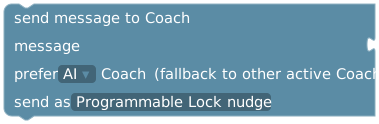
Supply message text, preferred AI/Bot Coach, and sender mode: internal PLE nudge, wearer message, or keyholder message. If the preferred coach is unavailable, the other active coach is used.
For interactive runs and simulated webhooks, waiting for a Coach counts toward the run's deadline (15 seconds by default). A timeout cancels the request and stops later steps. For example, if Send message to Coach times out before Add time, the time action does not run. Earlier completed actions remain applied; check the current lock state before retrying. See execution and failures.
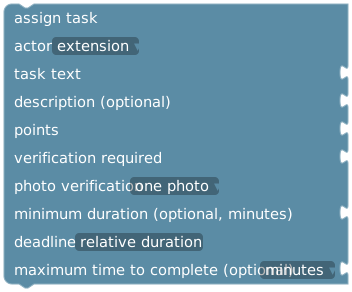
Choose actor, task text, optional description, points, verification requirement, photo mode, optional minimum duration, and deadline. Deadlines can be relative, end of the wearer's day, or a specific wearer-local date/time. A plain minimum-duration number is in minutes.

Select a task configured on this lock. Preserves its settings and writing-task link. Imported references missing from the destination lock must be selected again.
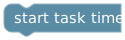
Starts the currently active timed task's timer.
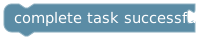
Uses a Boolean to mark the current task completed or failed. It acts on the current task, not an arbitrary task ID.
Assignment does not wait for completion: following blocks run immediately. For a reward after success, use when task assigned to store its task run ID and match that ID in when task completed. For before/after photo verification, the first photo comes before starting the timer and the second with completion verification. See Tasks & Task Queue.
Hygiene and cage checks
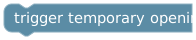
Starts a hygienic opening using the lock's configured hygienic settings. It cannot start while a hygienic opening or soft emergency release is already active.

Supply one minute to seven days and choose future breaks or remaining time of active break. Future mode changes the default but not existing grants. Active mode resets remaining time from now and requires an active break; it does not change grant acceptance deadlines.

Grants permission to start a break using the configured window. Acceptance expiry is one minute to 30 days, default 24 hours. An existing pending grant keeps its original expiry.

Removes all unused grants and their notifications, including keyholder, admin, and program grants. A started break continues. Can fail while a grant is being accepted.
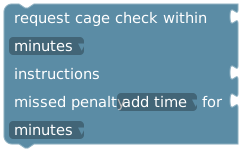
Supply the submission window, instructions, and optional missed penalty (add time or pillory with duration). The request window is not the penalty duration. Programmed penalties can be up to 365 days; values above that limit are rejected. The six-hour limit for manually requested cage checks does not apply to programmed penalties. Added lock time still respects the lock's maximum release time.
Example: a confirmed time change
In a GUI button, add show confirmation dialog. Put add time → 5 minutes inside if confirmed, and print text in UI → "Canceled" inside if canceled. Test both responses in draft mode before running it on an active lock. Placing add-time below the entire dialog instead would put it on the continuation path after either response.