Text
Text blocks build messages for buttons, notifications, calendar entries, logs, and prompts. Text operations do not send or display anything until their result is connected to an output action.
Blocks

A literal text value. Add spaces or punctuation exactly where you want them.
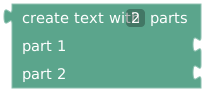
Joins 2–32 connected parts in order. Supports live variables, event values, numbers, and other value expressions. No spaces are inserted automatically.

Counts the characters in text known at compilation. It does not currently measure a live Text variable.

Replaces matching text, case-sensitively, in text known at compilation.

Returns a 1-based position, or 0 when missing, for text known at compilation.

Appends to the selected Text variable instead of replacing it.
Length, replace, and find currently resolve during compilation. Do not rely on them to process a runtime answer or event value. For runtime matching, use Logic → text contains or event text. For runtime output, use create text with.
Example: label a duration
print text in UI
  create text with 2 parts
    "Time remaining: "
    format duration (get time remaining in seconds)
The trailing space in the first part separates the label from the value. To show a date, use format Unix timestamp from Time & Date; joining a raw timestamp only prints its number.
When appending repeatedly, initialize the variable to empty text at the start of a new message. Otherwise previous runs' content remains.