Time & Date
A duration is an interval, such as 30 minutes. A timestamp is an absolute instant, such as tomorrow at 09:00. Both are numbers, so the connection shape alone cannot tell whether you used the right one.
Blocks

Enter YYYY-MM-DD and 24-hour HH:mm, then choose wearer-local or UTC. Returns a Unix timestamp in whole seconds.

Formats seconds as date/time (YYYY-MM-DD HH:mm:ss), date, or time in the selected timezone. Returns Text; invalid values return empty text.
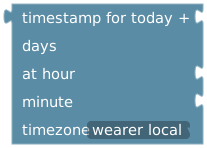
Uses a whole-number day offset and runtime hour/minute values. Hour must be 0–23 and minute 0–59. Returns a timestamp in seconds.

Reads execution time: Unix seconds, second, minute, hour, day of month, weekday, month, or year. Hours are 0–23; weekdays 1=Monday through 7=Sunday.

Fixed whole-number amount in seconds, minutes, hours, or days; returns seconds.

Combines the fields into seconds. Hours are 0–23 and minutes/seconds 0–59.

Converts a number, variable, or calculation in the selected unit into seconds.
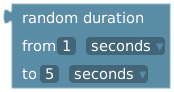
Chooses a duration between the two bounds, inclusive, in seconds. When connected to a duration action, the choice is made at runtime.

Converts seconds to readable Text, such as 2 days 3 hours.
Wearer-local values use the configured wearer/lock timezone at execution, not the editor's computer timezone. Current-time reads fall back to UTC when no valid timezone is available. Use weekly schedules for repeated weekday/time combinations; relative-date values compute an instant when evaluated.
Duration units
| Connection | Meaning |
|---|---|
Number 5 into add time with minutes selected | Five minutes. |
| duration 5 minutes directly into a duration-aware action | The duration block already supplies 300 seconds. |
Number variable containing 300 into add time | Select seconds to interpret it as five minutes. A variable does not retain a Duration block's unit. |
| current Unix timestamp into schedule-at | An absolute instant. It is not a delay. |
Calculations around durations also produce ordinary numbers. Selecting seconds on the receiving action is the clearest choice for values already expressed in seconds.
Timestamp units and event time
Date/time blocks, current Unix timestamp, the common event timestamp, and task submission timestamp use seconds. Do not divide these by 1,000.
Legacy wearer/keyholder last-seen timestamps, the event-specific max-date timestamp, the geofence event timestamp, and timer expiry timestamps use milliseconds. Divide those by 1,000 before using a seconds-based input. Calendar start/end timestamps use seconds. Check the event-variable tables instead of assuming all values named “timestamp” use the same unit.
Event timestamp describes the source occurrence (or its original queue time when supplied that way). Current time describes execution. Use task submission time when recording an approved task on its submission date; see Calendar.
Example: tomorrow at 09:00
Connect timestamp for today + 1 days at hour 9 minute 0, wearer local to schedule custom event at Unix timestamp. To delay by exactly 24 hours instead, use schedule custom event after → duration 1 day. These express different intentions around daylight-saving changes.