Functions
Functions group steps and calculations that you want to reuse. A definition does not run by itself; use its call block in an event, another function, or a value input when the function returns a value.
Blocks
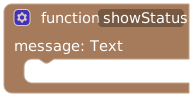
Name the function and connect its action body. Use the gear to add, name, type, remove, or reorder up to four parameters. Enable Return a value to add a return input at the bottom of the definition.
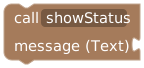
The Functions menu supplies a call for each defined function. Connect one value for each named parameter. A returning function's call is a value block that fits into other value inputs.

Reads a local parameter in the surrounding function. Select that function or a block inside it, then reopen Functions to find its parameter blocks.

Changes a local parameter for the current call. It does not change the caller's stored variable.
Parameters belong to that call and disappear when it returns. Use a workspace variable for a value that should persist between calls or runs.
Older imported functions can use legacy variable-bound parameters. Their original variable bindings remain and their parameter types stay Any for compatibility. Check that distinction before treating an old function as local-only.
Return values
Enable Return a value in the definition's gear menu, then connect a calculation, condition, text, or other value to its final return input. The function runs its body before evaluating that input. An empty return input produces null.
For example, define canPlay and return a condition combining the lock's state and a time limit. Its call can then go directly into an if condition, without storing the result in a workspace variable.
Select a returning function and open Functions to find the return block. Place it inside the function, including inside a condition or loop, to return early and skip the function's remaining steps. The caller continues with the returned value.
Returning functions used during an event can perform actions and open dialogs. A paused call retains its parameters and completed expression results; answering the dialog continues the calculation without repeating completed actions. Pending dialogs use the existing 15-minute continuation lifetime and become invalid if the program changes.
Automatically evaluated inputs, such as button visibility, button labels, cooldowns, and timer thresholds, can call functions that only calculate values or change their own parameters. Functions that modify workspace variables, perform actions, or open dialogs must be called within an event's steps. This keeps rendering controls and checking schedules free of side effects.
Toggling a function's return setting changes its call blocks between statement and value shapes. Reconnect affected calls in the appropriate slots; their argument blocks are retained.
Example: reuse a status message
- Create
showStatuswith one Text parameter namedmessage. - Select the function, open Functions, and connect its parameter message block to print text in UI in the function body.
- In one GUI button, call
showStatuswith"Ready". - In another GUI button, call it with
"Paused".
The two buttons reuse the same steps but pass different text. Setting message inside the function changes only that invocation's local value.
Calling and access limits
Keep function names distinct and supply compatible parameter types. Avoid recursive calls; nested calls have a depth limit of 12 and share the run's execution budget. A function call does not bypass the permissions or feature prerequisites of its actions.
Use AI access settings to choose which functions a coach may invoke. Exposing a function is separate from letting someone edit the program. Review the whole function, including any nested calls, before granting access.