Values
Values supplies numbers and calculations. Connect the result to a variable assignment, comparison, message, or action's numeric input. A number alone has no time unit; use Time & Date for durations.
Blocks

A fixed numeric value.

Add, subtract, multiply, divide, raise one number to a power, or select % for modulo (remainder). Supports runtime variables and event values. See the modulo example below.

A selected function such as square root, absolute value, negation, logarithm, or exponent. Use fixed numeric inputs; see limitations below.

A constant such as pi, e, golden ratio, or square roots. Avoid infinity for inputs that require finite numbers.
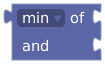
Smaller or larger of two fixed numeric values. For dynamic values, use a comparison and value-selecting if.

Converts to an integer using the selected mode. Supports runtime numeric inputs.

Remainder for fixed numeric inputs and a nonzero divisor.

Runtime integer in the inclusive range. Supports dynamic endpoints. Store it in a variable when several actions must use the same draw.

Decimal from 0 inclusive to 1 exclusive. Currently chosen when the workspace is compiled, so it is not a fresh random draw for each execution.
Current limitations
The editor uses Blockly-shaped blocks, but not every standard Blockly operation accepts live values in PLE. Single-number math, min/max, and the separate remainder block currently require values that can be resolved during compilation. Check warnings and the result when using an imported expression.
For a runtime absolute value, use if value < 0 then value 0 − value else value value. For a fresh random decimal with two decimal places, use random integer 0 to 99 ÷ 100. For a runtime minimum, use if A < B then value A else value B.
Example: calculate minutes from a counter
Create an Integer count. Connect count × 5 to a message or Number variable to calculate five minutes per item. To supply that duration to an action, use duration from (count × 5) minutes, or connect the number directly to an action whose selected unit is minutes. Keep units explicit.
Example: check an even score with modulo
In the two-input arithmetic block, select % from the same dropdown as +, −, ×, ÷, and power. Connect score on the left and 2 on the right, then compare the result to 0 to check whether the score is even. Unlike the separate remainder block, this accepts live variables and event values.
In Code mode:
let score: integer = 7;
button("Check score", () => {
  if (score % 2 == 0) {
    print("Score is even.");
  } else {
    print("Score is odd.");
  }
});
Modulo returns the remainder: 7 % 3 is 1, and -7 % 3 is -1. A zero divisor returns 0, matching PLE's division behavior. Guard the divisor first if zero should be treated as invalid in your program.