Variables
Variables keep values that later blocks can read. Create one in Variables, then use Manage variables to choose its type and starting value. The menu also provides variable-management and AI-access controls when available.
For values shared between selected wearers, use Global variable groups. Owners manage groups and each wearer's variable connections in Manage variables. These values have separate read/write blocks and a background change event.
Blocks

Reads the selected variable. Connect it to an input compatible with its type.
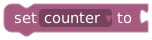
Replaces its value with the connected value.
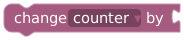
Adds a numeric amount. Use set variable to variable + value when you want an explicit calculation.
In the Code editor, this block appears as math.change({ var: count, delta: 1 });, using your declared variable identifier. Existing programs containing it can switch between Blockly and Code without replacing the block. See the code reference and counter example.
Text append is in Text. Function-local parameters have their own read/set blocks in Functions.
Choose a type
| Type | Typical use |
|---|---|
| Boolean | An enabled/disabled or done/not-done flag. |
| Number | A numeric amount, including decimals. |
| Integer | A whole-number counter. |
| Text | A name, message, or task run ID. |
| Number list | Saved dice results or another list of numbers. |
| Date and time | A whole-number date/time value; use a consistent timestamp unit with the receiving blocks. |
| Color | A six-digit hex color such as #4f46e5. |
| Any (legacy) | Dynamic values for older workspaces. Prefer a specific type for new variables. |
Assignments must match the declared type. An input prompt checks its submitted text against that type. Deleting a variable can delete the blocks using it, so read the confirmation.
Starting values and resets
Ordinary variables belong to the current extension session and persist between executions. Saving the workspace normally preserves compatible live values; editing a starting value is not a reliable way to reset a live counter. Use an intentional set variable action if a reset is required.
Draft mock values are separate. Completed draft runs retain mock variables until Reset test state. That reset does not reset the live session or saved memory.
Remember between sessions
In Manage variables, choose a saved set, then select This session only, Remember between sessions, or Use session history (read-only) for a typed variable.
Remembered values are linked by saved set and saved variable, not just matching display names. They are separated by wearer and controlling account. The controlling account is the wearer for a self-lock or the current controlling keyholder for a shared lock. Only that account can change links or reset saved values.
A remembered variable starts with its saved value when one exists; otherwise it uses the starting value. Read-only history values describe sessions using that saved set: session count, previous end time, and end reason. They are not the wearer's full account history and cannot be assigned by the program.
Changing a saved set disconnects previous links. Reset saved value affects all workspaces sharing that link for the wearer, and the next execution uses its starting value. See saved-memory details.
Example: keep a session counter
Create Integer buttonPresses, starting at 0. In a button, set it to buttonPresses + 1, then print it. Run twice in draft mode to see 1, then 2. Add a separate reset button only if the intended role should be able to reset it. Link saved memory only if this count should continue into future sessions.