UI
UI blocks show output and request choices while someone interacts with the program. Create the control that starts the flow with Events → on GUI button. Use Logs → send notification when an unattended event needs to reach a participant.
Blocks

Connect text to show in the program's output/preview area. Use create text with for values mixed with labels.
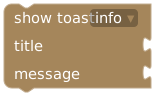
Select info, success, warning, or error and supply title/message for temporary feedback.
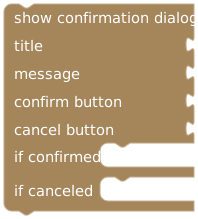
Supply title, message, confirm/cancel labels, and separate if confirmed / if canceled action branches.
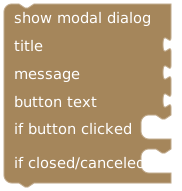
Supply title, message, and button text. Clicking the button runs its branch; closing/canceling runs the other branch.
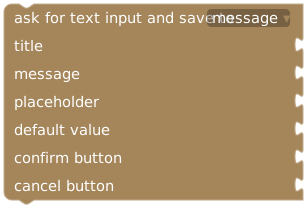
Choose a variable, title, message, placeholder, default text, and confirm/cancel labels. Submitted input is checked against the variable type. Cancel keeps the previous value and continues.
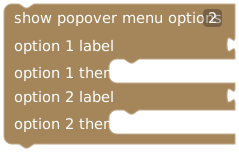
Add 1–12 labeled options with individual action branches. Selecting one runs that branch.
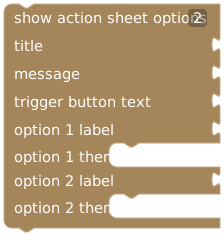
Add 1–12 labeled options, title, message, and trigger-button text. Each option has its own action branch.
The PLE wheel control is under Events. Older imported workspaces may also contain a show spin wheel action with 2–12 labeled/color options; it requests an interactive spin and runs the selected outcome's branch.
Put consequences inside the chosen branch
on GUI button "Choose message"
  show confirmation dialog
    title: "Continue?"
    message: "Choose which message to print."
    if confirmed
      print text in UI: "Confirmed"
    if canceled
      print text in UI: "Canceled"
An action connected after the entire dialog belongs to the continuation path after either response. Put an action that requires confirmation inside if confirmed.
For input, cancellation leaves the old value intact. Do not treat a nonempty variable after the prompt as proof that new input was submitted. Initialize it deliberately or use an additional confirmation if the following action must be explicitly approved.
Testing interactive flows
Test confirmation and cancellation, every menu branch, empty input, and a value rejected by the selected variable type. Read whether the editor is in draft mock or active-session mode. Inspect compiler warnings about interactive flows and earlier actions; do not put repeated rewards or other consequences before a prompt without checking the continuation behavior.
A dialog cannot supply a response by itself during an unattended automation. Prefer autonomous logic for background events, and keep input-dependent flows attached to a participant's control.