Shock / Vibrate
These action blocks send commands to the selected device or secondary accessories. Configure the device connection and permitted modes first. Wearer limits still apply, and a successful command request does not by itself prove physical delivery. See Shock Delivery & Queues for queue and connection behavior.
Secondary keyholders use these same blocks with their approved shock/vibration permissions, consent limits and device eligibility. Direct runs retain grant authority through queued delivery. Untimed random/berserk starts are bounded to the grant's maximum command duration; stopping commands still requires current access.
Shock blocks

Fixed values. Type duration and intensity directly into the fields. Select seconds, minutes, or hours and default, random, or berserk mode.

Value inputs. Connect Number, variable, or calculation blocks for duration and intensity; choose the duration unit and mode.

Fixed values. Type duration and intensity and select Wave 1–10. If the wave is disabled or the device is another model, the wearer/device default is used and the fallback is recorded in PLE history.
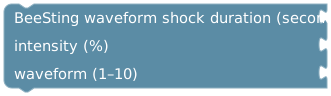
Value inputs. Connect duration in seconds, intensity, and waveform number. Duration is 1–300 seconds, intensity 1–100%, and waveform 1–10. The same default-wave fallback applies.
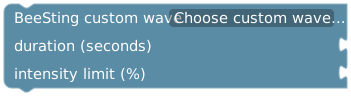
Select a saved or community wave. Connect duration in seconds and intensity limit. The wave repeats for 1–300 seconds and every step is limited by the intensity input and wearer limits. Private waves must belong to the controlling account. Reselect a changed/unavailable wave. Requires BeeSting; other devices do not receive a replacement shock.

Requests that the shock stop.
Vibration and stop blocks

Fixed values. Type duration, intensity, and frequency. Choose the duration unit. Duration is limited to five minutes; intensity and frequency to 1–100%.

Value inputs. The same action with numeric connections for duration, intensity, and frequency.
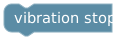
Requests that the selected device's vibration stop.

Fixed values. Vibrates the first connected secondary accessory, such as a Lovense toy or Pear Flower II. Type duration and intensity; choose steady, pulse, wave, climb, tease, or alternate. Limited to five minutes and 1–100% intensity.
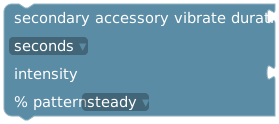
Value inputs. The same secondary-accessory action with numeric duration and intensity connections.

Stops vibration on all enabled secondary accessories.
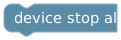
Sends the device stop-all command. Use the separate secondary-accessory stop block when stopping those accessories too.
A Duration block supplies seconds. For a duration stored in a Number variable, choose seconds on the receiving action to avoid interpreting that value as minutes or hours. See Time & Date.
Example: check the device before a command
Use get device data to branch on is BeeSting and connected before a BeeSting-specific action. Put a toast explaining the missing prerequisite in the other branch. Model identity and connection state are different checks; a custom device name is not a model check.
Develop the branching in draft mock mode. A draft result does not test Bluetooth, device permissions, or real delivery. Review any live command's duration and intensity before running it.
Secondary-keyholder commands
A device command authorized through a secondary-keyholder grant does not trigger the primary keyholder's Device shocked automation. The command keeps its own actor, session and limits through queued delivery; it cannot inherit a program's broader permissions. This does not change ordinary primary-keyholder, wearer or program-generated events.