Logs
Logs blocks record information or send an in-app notification. These are separate from PLE's automatic execution log and from temporary UI output.
Blocks

Supply a title, description, optional color, and icon field for a lock log entry. Use it to record a meaningful program outcome.
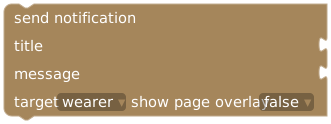
Supply title and message, choose wearer/keyholder/both, and whether to show a page overlay. Sends an in-app extension notification.
Use print text in UI or show toast from UI for temporary feedback during interaction. Use send notification when an automatic event needs to notify a participant. Notification behavior still follows the app and recipient's settings; an in-app notification is not a promise of an external email or push delivery.
Example: record a completed task
Inside when task completed:
create log entry
  title: "Task completed"
  description: create text with "Completed: " and event variable task title
  color: color picker
Add a separate notification only if that audience needs it. If filtering for a specific task, put both actions inside the matching condition. Re-running an event can create additional entries or notifications; inspect existing results before retrying a partially failed run.
See Read the execution log for diagnosing program runs.